Photobooth hire companies
Prepare each booking with its photo templates, welcome screen and print limits. Find all your events in the same software.

For photobooth professionals
Install Captivo on your photobooth’s PC to take the photos, customise the prints, print them and share them by QR code. Subscription software for your weddings, private parties and corporate events.
30-day trialNo card requiredWindows 10 & 11
Software only: you provide the PC, camera, printer and consumables separately.
€10 excl. VAT per month for 1 booth
€120 excl. VAT billed per year · or €12 excl. VAT billed monthly

Languages
Captivo’s management interface (events, settings, template editor) and the Companion app are in French. The screens your guests use (capture, result, printing, sharing) and the pages they open on their phones are in French and English. Spanish has been developed and will be included in the next Windows update; it is not available yet. Written support answers in English, French or Spanish; the online documentation is in French.
Do you own or build a photobooth, a selfie booth or a classic photo booth running on a Windows PC? Captivo provides the tools to prepare and run your photo sessions.
Prepare each booking with its photo templates, welcome screen and print limits. Find all your events in the same software.
Offer a photo activity with your compatible Canon camera or a webcam, and a printer if your service includes prints.
Adapt the templates and screens to the colours of a wedding, a company or a private party.
Each event brings together your details, print templates and settings. Look through Captivo’s screens before you download the trial.
The demo events are fictitious. Click to view the screenshot at full size.
Text, images, shapes and photo slots, arranged in your own layout.
Customise the capture, preview and gallery screens.
Add a logo, names, a date or a design around the photos. Save your template to assign it to an event and reuse it for a future booking.
Guests start their session on the booth screen. Captivo assembles the shots into your template, then offers the actions set up for the event.
The countdown guides the guests. Photos are taken with a compatible Canon camera or a webcam connected to the PC.
The software sends the print to the printer configured in Windows. You choose the photo template and the print limits.
The guest scans the QR code with their phone to open the gallery set up for the event. The online gallery requires an internet connection; local sharing requires a configured Wi-Fi network.
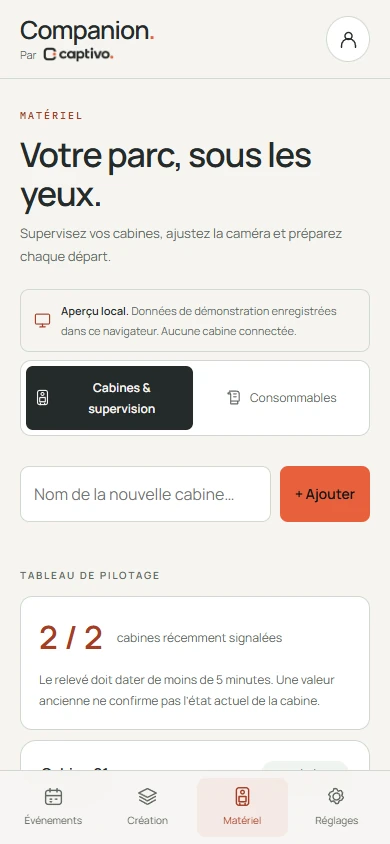
Companion is the optional web app that works alongside Captivo. From a computer or a phone, prepare events and check the settings and counters of your connected booths.
Companion add-on: €2 excl. VAT per month on annual billing, €5 on monthly billing. An internet connection is required for remote monitoring.
Discover CompanionCompanion and the other add-ons are added to the plan: €24 excl. VAT per year each, i.e. €2 excl. VAT per month, or €5 excl. VAT billed monthly. Hardware and consumables are not included.
Try everything for 30 daysComputer, camera, lighting, screen, printer and software: the role of each component and the tests to run before your first hire.
Pixel dimensions, safety margins and five free SVG templates to prepare your print designs.
Captivo installs on your booth’s Windows 10 or 11 PC, 64-bit. Capture uses a compatible Canon camera or a webcam; printing relies on the Windows driver. Check the compatibility list (in French) and run a test on your own hardware before your first event.
The plan, the add-ons and the Companion app, with no card required. You can prepare an event and test your capture and printing setup. Your photos, templates and settings are not deleted when the trial ends.
Captivo is the software for your booth. The PC, screen, camera, printer, lighting and consumables must be provided separately.
Capture and printing work on the PC. The online gallery and Companion monitoring require a connection. Local sharing over Wi-Fi needs its own configuration and a network the guests’ phones can reach.
The screens guests see at the booth (capture, result, printing, sharing) and the pages they open on their phones are in French and English. Spanish has been developed and will arrive with the next Windows update; it is not available yet. The management interface (events, settings, template editor), the Companion app and the online documentation are in French. Written support answers in English, French or Spanish.
Install the software on your Windows PC, create a photo template and test capture, printing and sharing. The plan and add-ons are included in the trial, with no card required.
30-day trialNo card requiredWindows 10 & 11